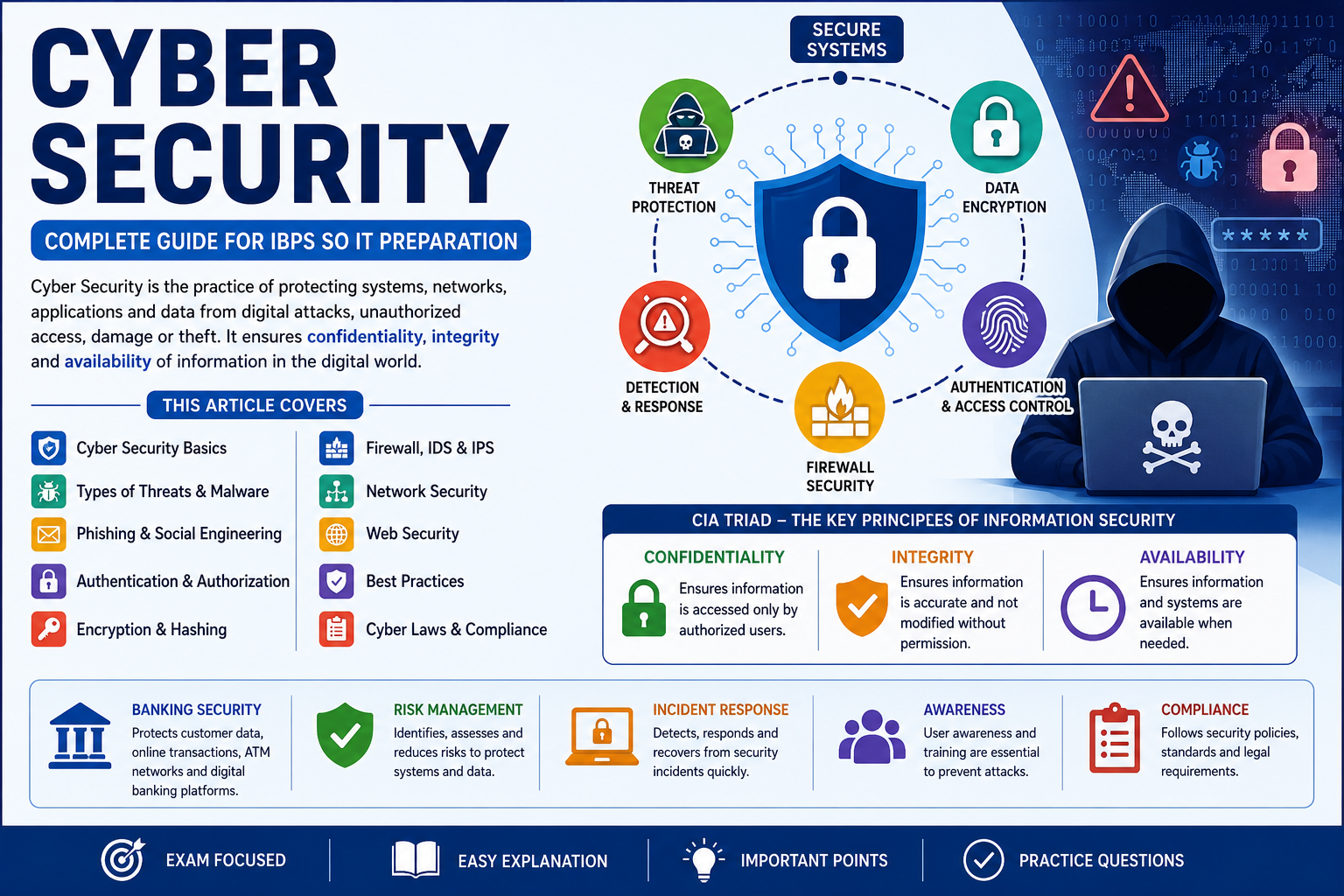
Cyber Security for IBPS SO IT Preparation
Cyber Security is one of the most important topics for IBPS SO IT Officer preparation. In the Professional Knowledge section, questions can be asked from information security, cyber attacks, malware, phishing, encryption, authentication, authorization, firewall, IDS, IPS, digital signature, network security, web security, and banking security.
Cyber Security means protecting computers, networks, servers, applications, and data from unauthorized access, attacks, damage, or theft. In the banking sector, cyber security is extremely important because banks handle sensitive customer information, financial transactions, digital payments, ATM networks, internet banking, mobile banking, and internal banking systems.
What is Cyber Security?
Cyber Security is the practice of protecting digital systems, networks, applications, and data from cyber threats. It includes technologies, processes, and policies used to protect information from unauthorized access, misuse, modification, and destruction.
In simple words, Cyber Security protects digital data and systems from hackers, malware, fraud, and other online threats.
Why Cyber Security is Important for IBPS SO IT?
Cyber Security is important for IBPS SO IT because IT Officers in banks work with secure systems, customer data, digital transactions, servers, networks, databases, online banking platforms, and security policies. A strong understanding of cyber security helps in protecting banking systems from fraud, phishing, malware, data breaches, and unauthorized access.
Cyber Security in Banking Sector
Banking systems require strong cyber security because they deal with money and confidential customer data. Online banking, mobile banking, UPI, ATM services, card payments, and net banking must be protected from cyber attacks. A small security weakness can cause financial loss, data leakage, and trust issues.
Banking Area Cyber Security Need Internet Banking Secure login, encryption, fraud detection, and transaction monitoring Mobile Banking App security, device authentication, and secure API communication ATM Network Card security, PIN protection, network security, and fraud prevention Database Systems Access control, encryption, backup, and audit logs Payment Gateway Secure transaction processing and protection from payment fraud
Basic Goals of Cyber Security: CIA Triad
The CIA Triad is the foundation of information security. CIA stands for Confidentiality, Integrity, and Availability.
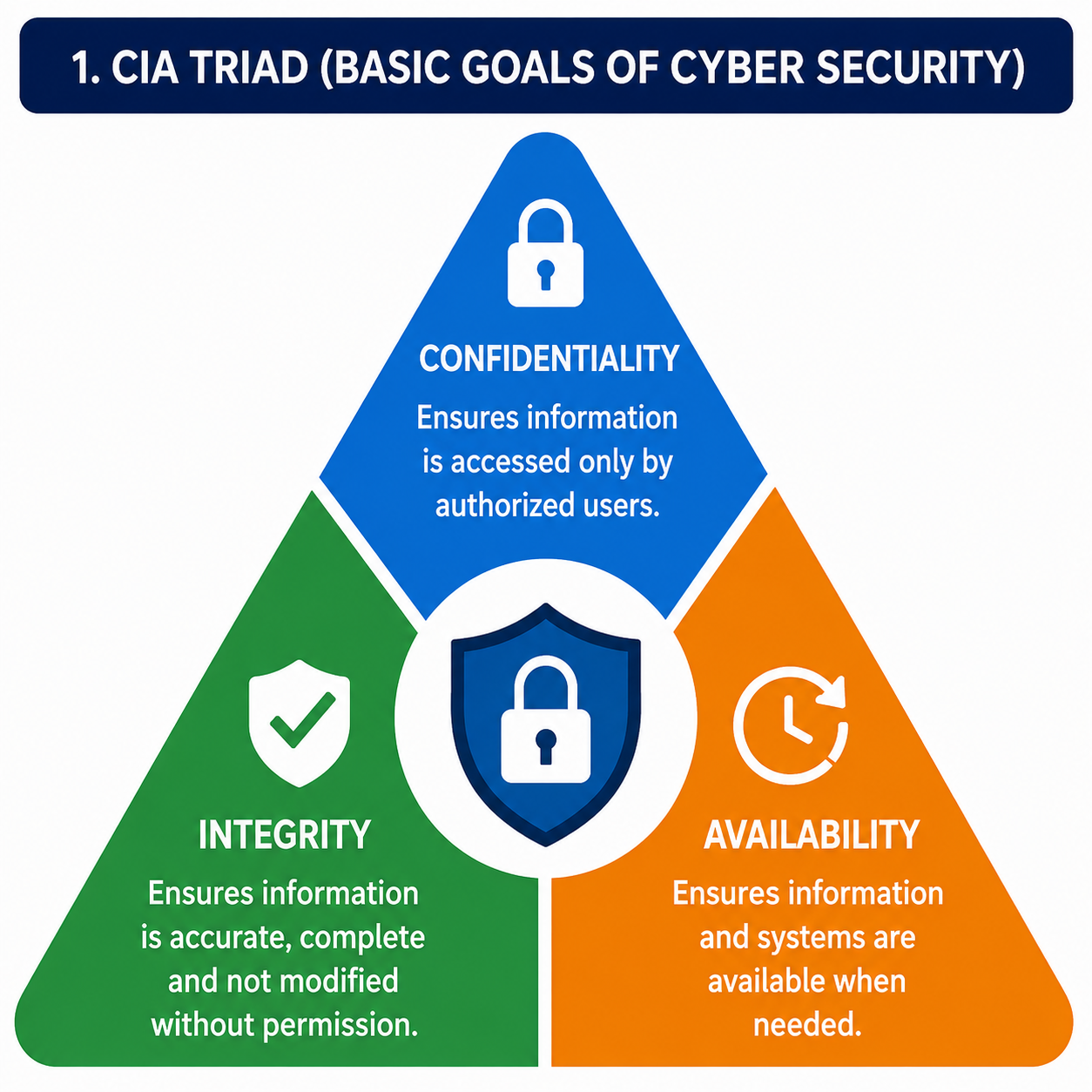
CIA Component Meaning Example Confidentiality Ensures data is accessed only by authorized users. Password protection and encryption Integrity Ensures data is accurate and not modified without permission. Hashing and digital signature Availability Ensures systems and data are available when needed. Backup server and DDoS protection
Important Cyber Security Terms
Term Meaning Threat A possible danger that can harm a system or data. Vulnerability A weakness in a system that can be exploited by attackers. Attack An action taken to exploit a vulnerability. Risk The chance of loss due to a threat exploiting a vulnerability. Asset Anything valuable that needs protection, such as data or server. Exploit A method used to take advantage of a vulnerability. Patch A software update used to fix security weaknesses.
Types of Cyber Threats
Cyber threats are harmful activities that target digital systems, networks, or data. These threats can come from hackers, malware, insiders, phishing attackers, or automated attack tools.
Threat Meaning Example Malware Malicious software designed to harm systems. Virus, worm, trojan, ransomware Phishing Fraud technique used to steal sensitive information. Fake bank login page DoS Attack Attack that makes a service unavailable. Overloading a server with requests Man-in-the-Middle Attack Attacker secretly intercepts communication. Intercepting data on insecure Wi-Fi Password Attack Attack to guess or steal passwords. Brute force or dictionary attack SQL Injection Attack that inserts malicious SQL into input fields. Bypassing login using unsafe queries Insider Threat Threat caused by people inside the organization. Employee misusing access
Malware
Malware stands for malicious software. It is designed to damage, disrupt, steal, or gain unauthorized access to computer systems. Malware is one of the most common cyber security threats.
Types of Malware
Malware Type Meaning Important Point Virus Attaches itself to files and spreads when the file runs. Needs host file Worm Self-replicating malware that spreads across networks. Does not need host file Trojan Horse Looks like useful software but performs harmful actions. Tricks user Ransomware Encrypts victim data and demands payment. Very dangerous for organizations Spyware Secretly collects user information. Steals data silently Adware Shows unwanted advertisements. Can affect user experience Rootkit Hides malicious activities and gives attacker control. Difficult to detect
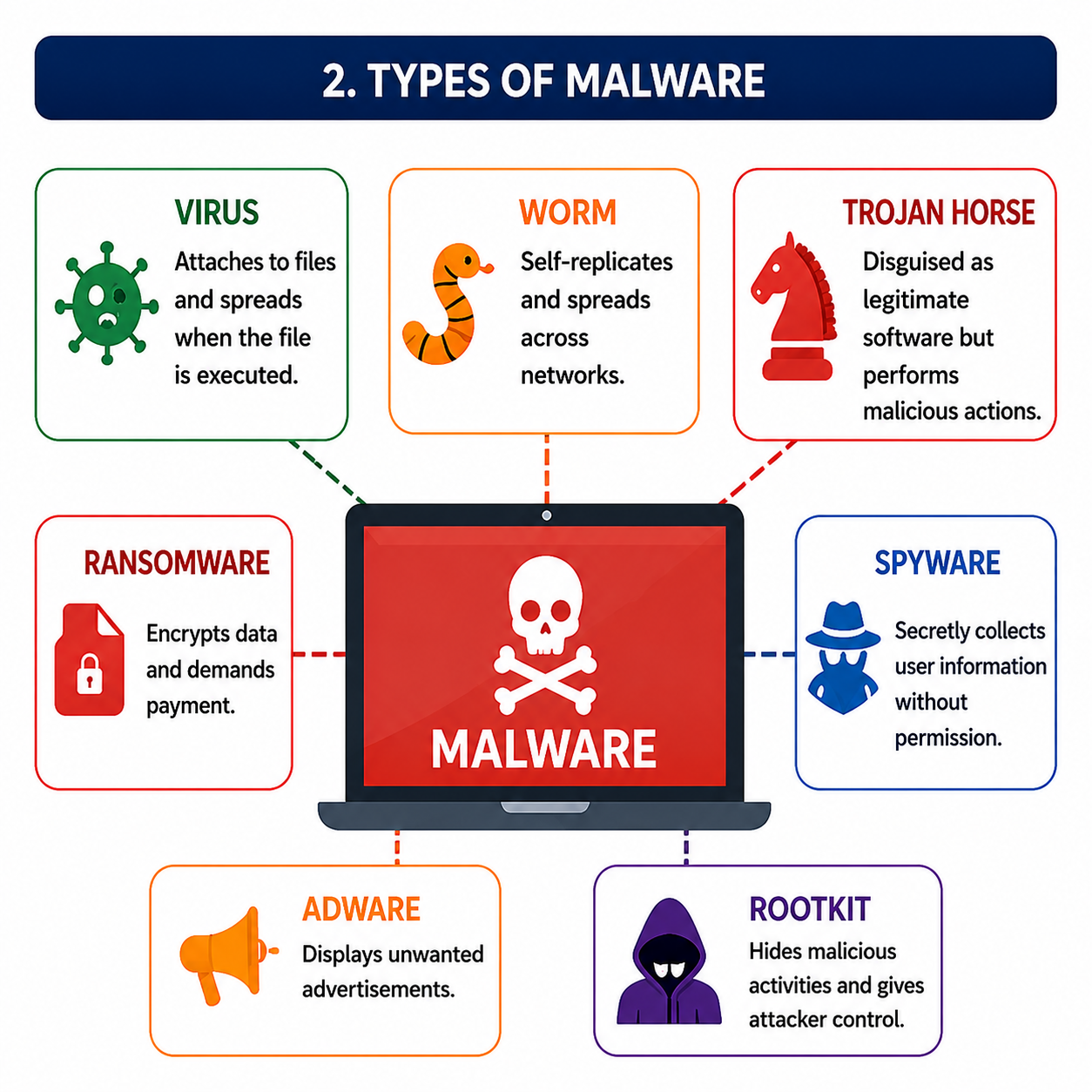
Virus vs Worm vs Trojan
Basis Virus Worm Trojan Host Requirement Needs a host file Does not need host file Disguised as useful software Spreading Spreads when infected file executes Spreads automatically over networks Spreads when user installs or runs it Main Feature Infects files Self-replicates Tricks users Example Risk File corruption Network slowdown Data theft or backdoor access
Phishing
Phishing is a cyber attack where attackers trick users into revealing sensitive information such as passwords, OTPs, card details, or banking credentials. Phishing is commonly done through fake emails, fake websites, SMS, or social media messages.
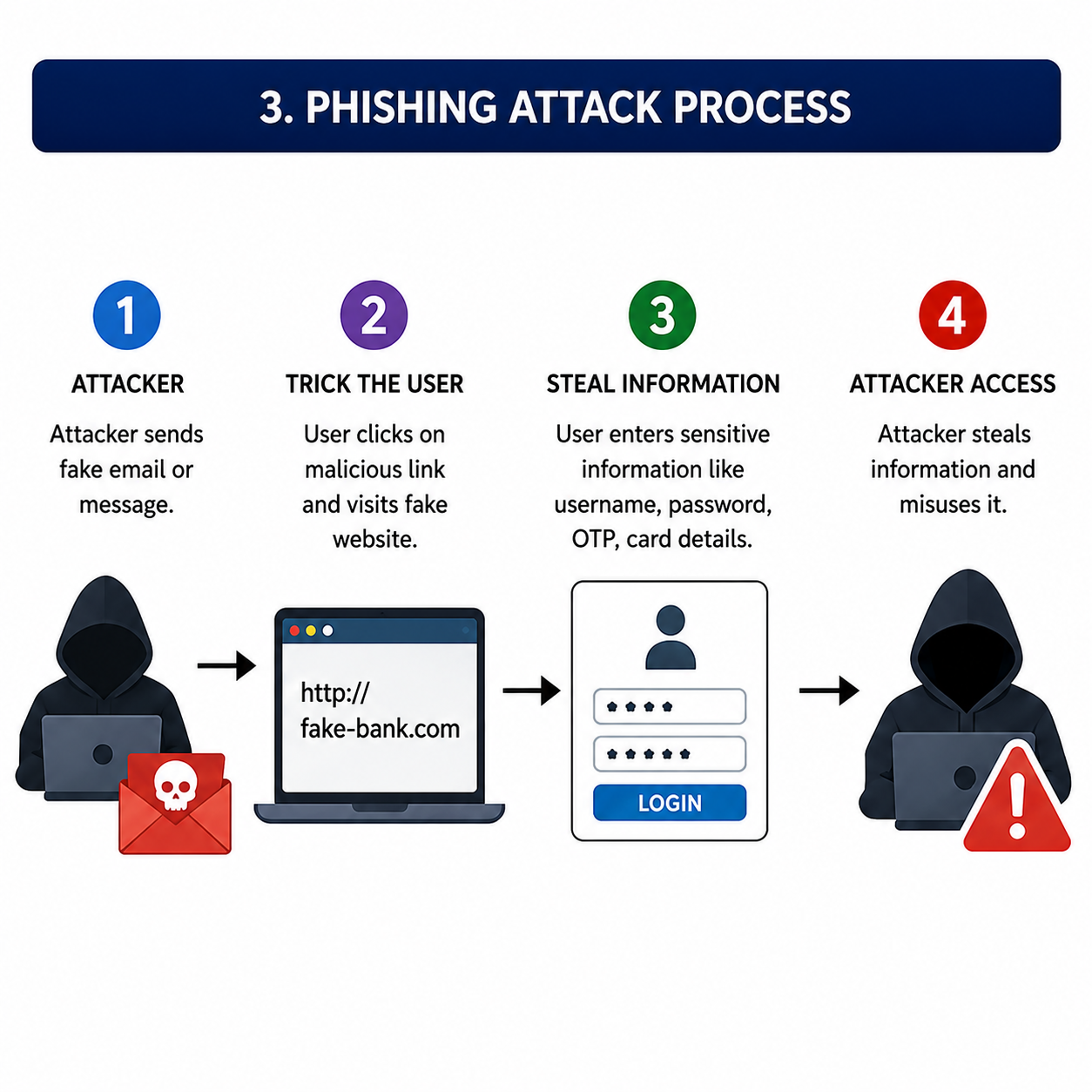
Common Signs of Phishing
Sign Explanation Fake urgency Message says account will be blocked immediately. Suspicious link Link looks similar to a real website but has small changes. Grammar mistakes Many phishing messages contain spelling or grammar errors. Asking for OTP or password Legitimate banks do not ask for OTP or password through email or SMS. Unknown sender Email or message comes from an unusual or suspicious address.
Authentication and Authorization
Authentication and authorization are important access control concepts in cyber security.
Basis Authentication Authorization Meaning Verifies who the user is. Determines what the user can access. Question Answered Who are you? What are you allowed to do? Example Login using username and password Permission to view account statement Order Comes first Comes after authentication
Factors of Authentication
Factor Meaning Example Something You Know Knowledge-based authentication Password, PIN Something You Have Possession-based authentication OTP, smart card, security token Something You Are Biometric authentication Fingerprint, face recognition, iris scan
Multi-Factor Authentication
Multi-Factor Authentication, also called MFA, uses two or more authentication factors to verify a user. For example, a user may enter a password and then verify an OTP. MFA improves security because even if one factor is stolen, another factor is still required.
Encryption
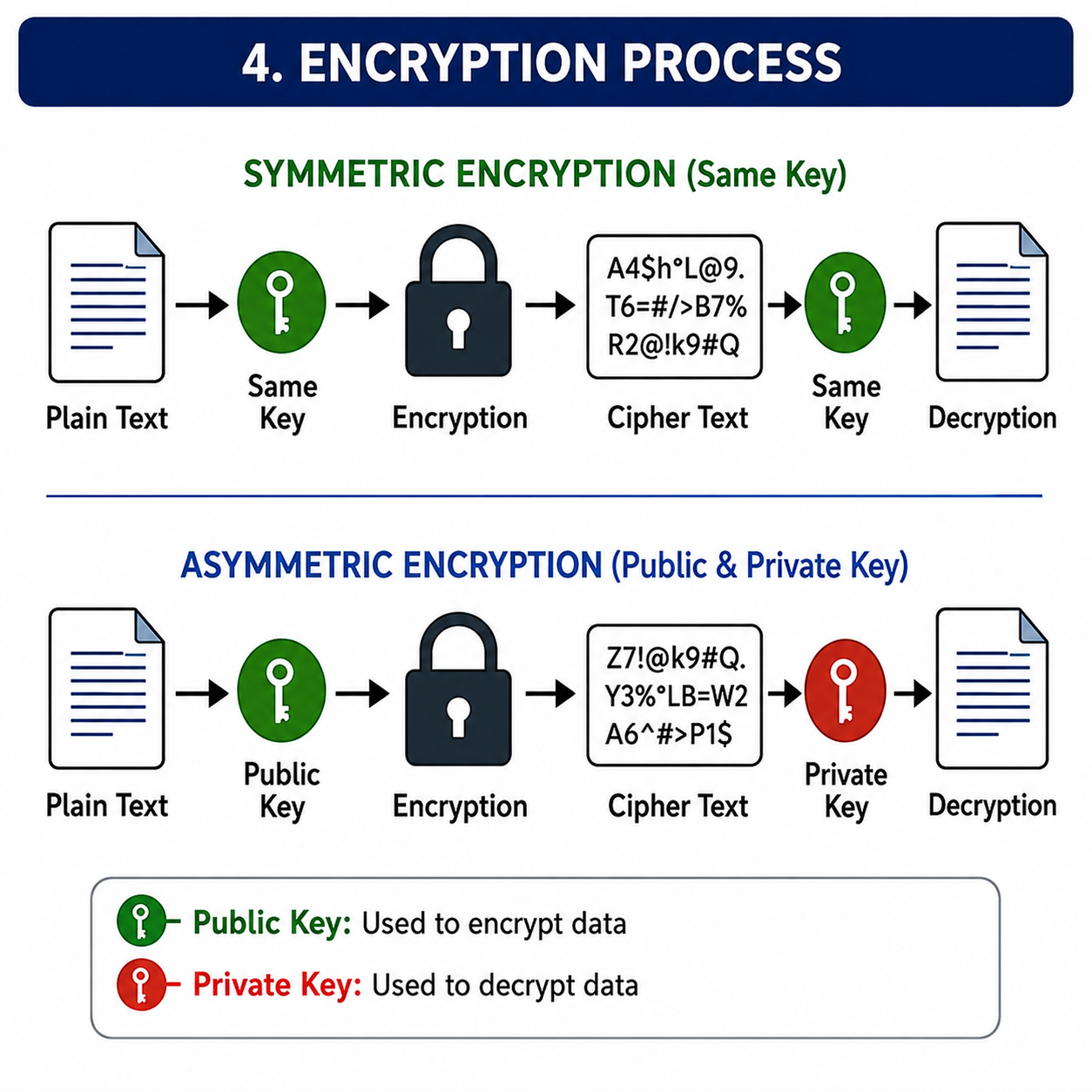
Encryption is the process of converting readable data into unreadable form to protect it from unauthorized access. The readable data is called plaintext, and the unreadable data is called ciphertext. Decryption converts ciphertext back into plaintext.
Types of Encryption
Type Meaning Example Symmetric Encryption Same key is used for encryption and decryption. AES, DES Asymmetric Encryption Public key and private key are used. RSA, ECC
Symmetric vs Asymmetric Encryption
Basis Symmetric Encryption Asymmetric Encryption Keys Used Same key for encryption and decryption Public key and private key Speed Faster Slower Key Sharing Key sharing is difficult Public key can be shared openly Best Used For Large data encryption Secure key exchange and digital signatures Examples AES, DES RSA, ECC
Hashing
Hashing is the process of converting data into a fixed-length value called a hash value or message digest. Hashing is one-way, which means original data cannot be easily obtained from the hash value.
Hashing is commonly used for password storage, data integrity checking, and digital signatures.
Concept Meaning Encryption Two-way process. Data can be encrypted and decrypted. Hashing One-way process. Original data cannot be easily recovered. Encoding Converts data into another format, mainly for compatibility, not security.
Digital Signature
A digital signature is used to verify the authenticity and integrity of a digital message or document. It proves that the message was sent by the actual sender and was not changed during transmission.
Digital signatures use asymmetric cryptography. The sender signs the message using a private key, and the receiver verifies it using the sender's public key.
Firewall
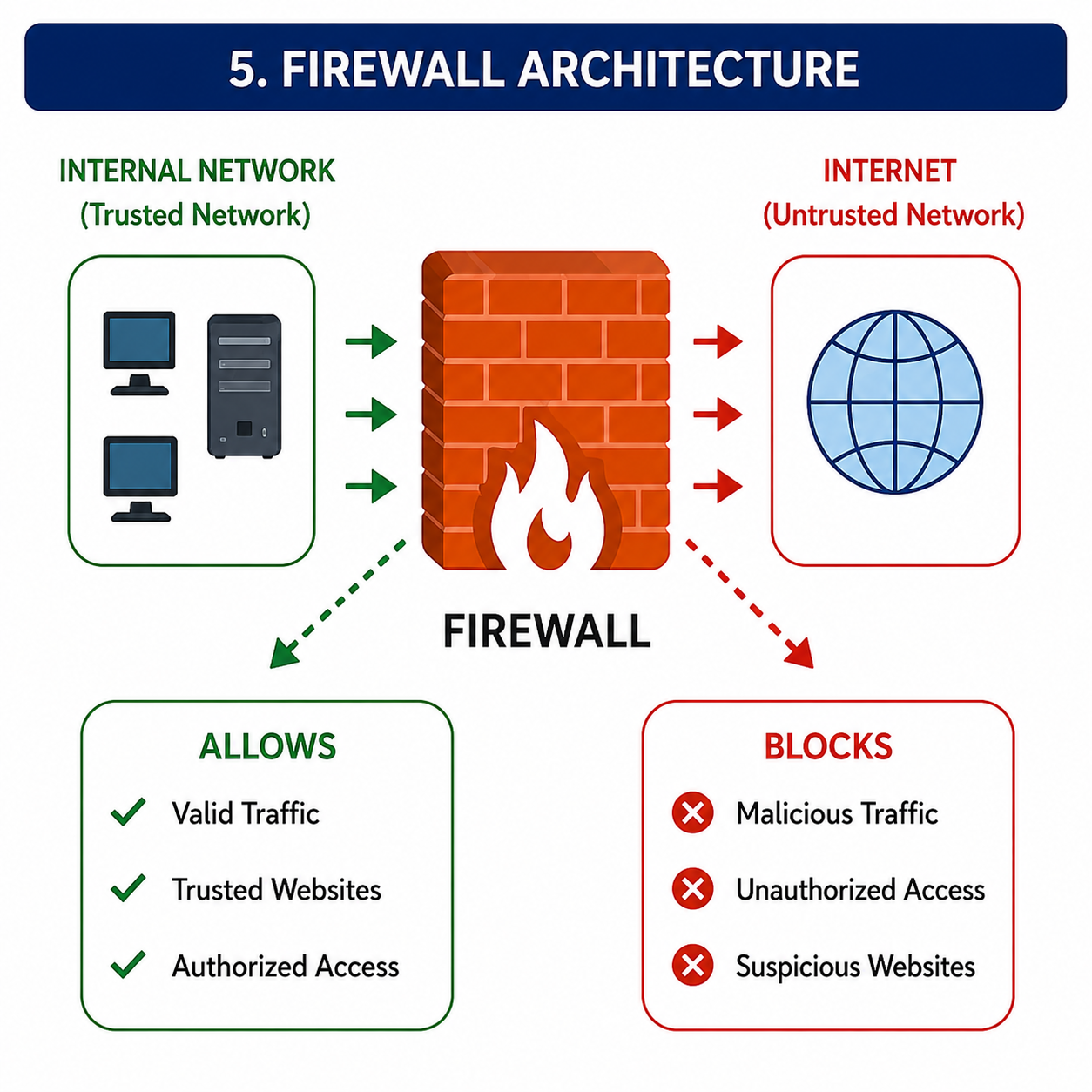
A firewall is a security device or software that monitors and controls incoming and outgoing network traffic based on security rules. It acts as a barrier between trusted internal networks and untrusted external networks.
Types of Firewalls
Firewall Type Meaning Packet Filtering Firewall Filters packets based on IP address, port, and protocol. Stateful Firewall Tracks active connections and makes decisions based on connection state. Proxy Firewall Acts as an intermediate between user and internet. Next-Generation Firewall Provides advanced features like application control and intrusion prevention.
IDS and IPS
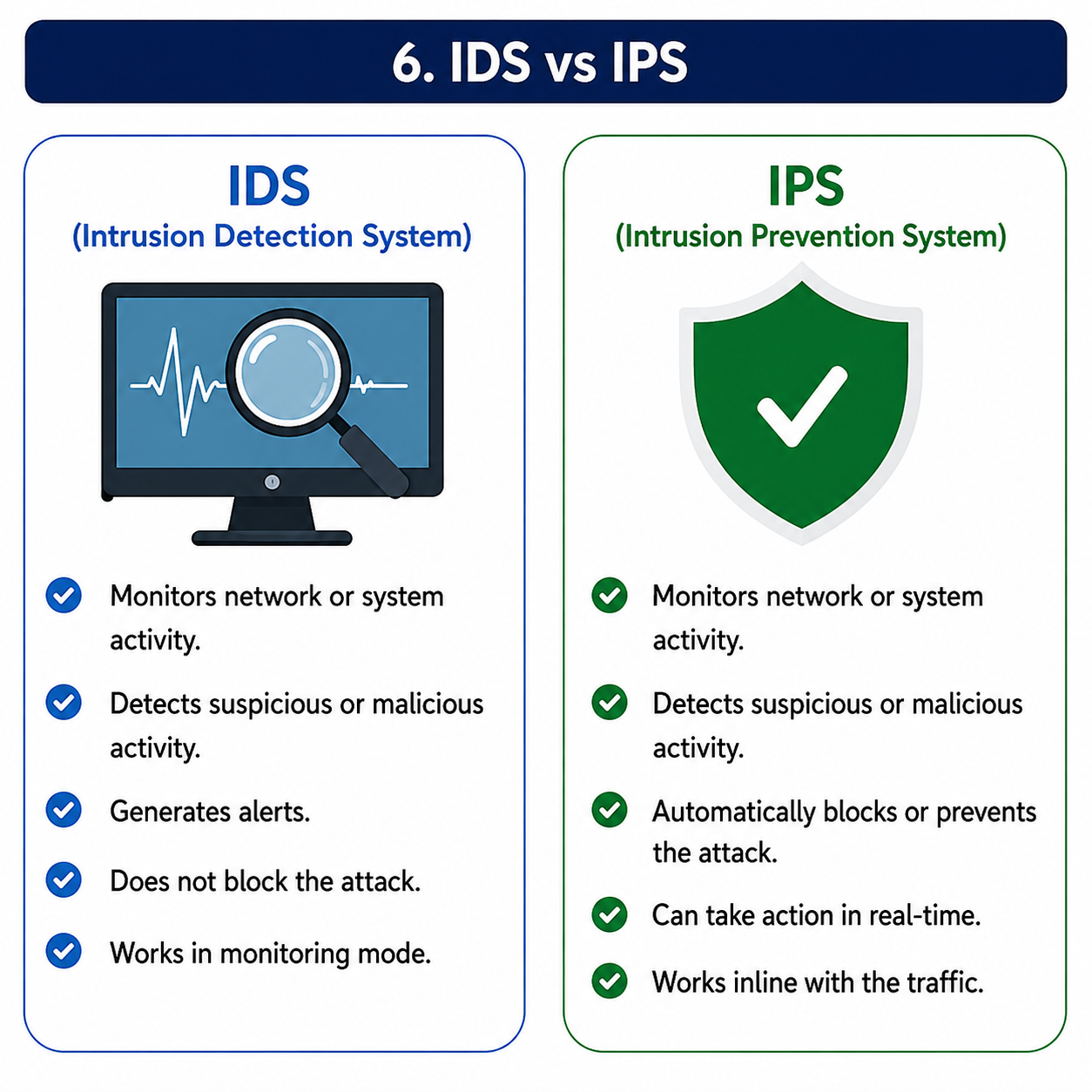
IDS stands for Intrusion Detection System. It monitors network or system activity and detects suspicious behavior. IPS stands for Intrusion Prevention System. It not only detects threats but also blocks or prevents them.
Basis IDS IPS Full Form Intrusion Detection System Intrusion Prevention System Main Work Detects suspicious activity Detects and blocks suspicious activity Action Generates alerts Prevents or blocks threats Placement Usually works in monitoring mode Usually placed inline with traffic
Network Security
Network Security protects network infrastructure from unauthorized access, misuse, attacks, and disruption. It includes firewalls, VPNs, IDS, IPS, access control, encryption, secure protocols, and monitoring.
Common Network Security Tools
Tool or Concept Use Firewall Filters network traffic. VPN Creates secure encrypted communication over public network. Antivirus Detects and removes malware. IDS Detects suspicious activity. IPS Detects and prevents attacks. Access Control Controls who can access resources. SIEM Collects and analyzes security logs.
VPN
VPN stands for Virtual Private Network. It creates a secure encrypted tunnel over a public network. VPN is used for secure remote access and private communication over the internet.
Web Security
Web security protects websites, web applications, servers, and users from online attacks. Common web security threats include SQL injection, cross-site scripting, cross-site request forgery, insecure authentication, and data leakage.
Common Web Attacks
Attack Meaning Prevention SQL Injection Malicious SQL is inserted into input fields. Use parameterized queries and input validation. XSS Attacker injects malicious script into web pages. Use output encoding and sanitize input. CSRF Forces user to perform unwanted actions on a trusted site. Use CSRF tokens and same-site cookies. Broken Authentication Weak login/session management can allow unauthorized access. Use strong authentication and secure sessions.
Secure Protocols
Secure protocols protect data during communication. They are important for internet banking, online payment systems, and secure remote access.
Protocol Purpose Important Point HTTPS Secure web communication Uses TLS/SSL and port 443 SSH Secure remote login More secure than Telnet SFTP Secure file transfer Uses SSH VPN Secure tunnel communication Used for remote access TLS Secures communication over network Successor of SSL
Access Control
Access control means deciding who can access which resources. It helps protect sensitive data and systems from unauthorized use.
Types of Access Control
Access Control Type Meaning DAC Discretionary Access Control. Owner decides access permissions. MAC Mandatory Access Control. Access is controlled by strict security policies. RBAC Role-Based Access Control. Access is based on user roles. ABAC Attribute-Based Access Control. Access depends on attributes like user, location, or time.
Common Cyber Security Attacks
Attack Target Protection Method Phishing User credentials User awareness, MFA, email filtering Ransomware Files and systems Backup, patching, antivirus, awareness DDoS Server availability Traffic filtering and DDoS protection SQL Injection Database Parameterized queries and input validation MITM Communication channel Encryption, HTTPS, VPN Password Attack User account Strong passwords and MFA
Cyber Security Best Practices
Cyber security best practices help reduce security risks and protect systems from common attacks.
Best Practice Purpose Use strong passwords Protects accounts from password attacks. Enable MFA Adds extra security beyond password. Update software regularly Fixes known security vulnerabilities. Use antivirus Detects and removes malware. Take regular backups Helps recover data after ransomware or failure. Use secure protocols Protects communication from interception. Limit user access Reduces damage from unauthorized access. Monitor logs Helps detect suspicious activity.
Cyber Security Laws and Compliance
Cyber security laws and compliance rules help organizations protect data and follow legal requirements. In banking, compliance is important because financial institutions handle sensitive customer and transaction data.
Important areas include data privacy, secure storage, access control, audit logging, incident reporting, and customer data protection.
Incident Response
Incident response is the process of handling cyber security incidents such as malware infection, data breach, phishing attack, or unauthorized access. A proper incident response plan helps reduce damage and restore normal operations quickly.
Step Meaning Preparation Create policies, tools, backup, and response team. Detection Identify suspicious activity or security incident. Containment Limit the damage and stop the spread. Eradication Remove the threat from the system. Recovery Restore systems and services. Lessons Learned Analyze incident and improve security.
Important Cyber Security Exam Points for IBPS SO IT
Topic Must Remember Point CIA Triad Confidentiality, Integrity, and Availability Virus Needs host file to spread Worm Self-replicating malware Trojan Disguised as legitimate software Ransomware Encrypts data and demands payment Phishing Tricks users into revealing sensitive information Authentication Verifies identity of user Authorization Decides access permissions Symmetric Encryption Uses same key for encryption and decryption Asymmetric Encryption Uses public key and private key Hashing One-way process used for integrity Firewall Filters incoming and outgoing network traffic IDS Detects intrusion and generates alert IPS Detects and blocks intrusion HTTPS Secure HTTP using TLS/SSL, port 443
Common Mistakes Students Make in Cyber Security
Many students confuse authentication and authorization. Authentication verifies the identity of a user, while authorization decides what resources the user can access.
Students also confuse encryption and hashing. Encryption is reversible using a key, while hashing is one-way and mainly used for integrity and password storage.
Another common mistake is confusion between IDS and IPS. IDS only detects and alerts, while IPS detects and prevents threats.
How to Prepare Cyber Security for IBPS SO IT
To prepare Cyber Security for IBPS SO IT, start with basic concepts like CIA triad, threat, vulnerability, attack, risk, malware, and phishing. Then study encryption, hashing, digital signature, authentication, authorization, firewall, IDS, IPS, VPN, web security, and network security.
Make short notes of important differences such as authentication vs authorization, encryption vs hashing, IDS vs IPS, virus vs worm vs trojan, symmetric vs asymmetric encryption, and HTTP vs HTTPS.
Practice Cyber Security Quiz
After reading this article, practice MCQs to check your preparation level. Attempt the Cyber Security quiz here: Start Cyber Security Quiz
Conclusion
Cyber Security is an important and scoring topic for IBPS SO IT preparation. Students should focus on CIA triad, malware, phishing, authentication, encryption, hashing, digital signature, firewall, IDS, IPS, VPN, web security, network security, and banking security concepts. With regular revision and MCQ practice, Cyber Security can help improve your Professional Knowledge score.
Frequently Asked Questions on Cyber Security
What is Cyber Security?
Cyber Security is the practice of protecting computers, networks, applications, and data from unauthorized access, attacks, damage, or theft.
What is the CIA Triad?
The CIA Triad stands for Confidentiality, Integrity, and Availability. It is the basic foundation of information security.
What is malware?
Malware is malicious software designed to harm, disrupt, steal, or gain unauthorized access to computer systems.
What is phishing?
Phishing is a fraud technique where attackers trick users into revealing sensitive information such as passwords, OTPs, or banking details.
What is the difference between authentication and authorization?
Authentication verifies who the user is, while authorization decides what the user is allowed to access.
What is encryption?
Encryption is the process of converting readable data into unreadable form to protect it from unauthorized access.
What is hashing?
Hashing is a one-way process that converts data into a fixed-length hash value. It is used for integrity checking and password storage.
What is a firewall?
A firewall is a security device or software that filters incoming and outgoing network traffic based on security rules.
What is the difference between IDS and IPS?
IDS detects suspicious activity and generates alerts, while IPS detects and blocks suspicious activity.
Is Cyber Security important for IBPS SO IT?
Yes, Cyber Security is important for IBPS SO IT because questions can be asked from information security, malware, phishing, encryption, firewall, IDS, IPS, and banking security concepts.