Cloud Computing for IBPS SO IT Mains Preparation
Cloud Computing is an important topic for IBPS SO IT Mains Professional Knowledge. Questions can be asked from cloud basics, cloud service models, deployment models, virtualization, cloud storage, cloud security, serverless computing, containers, SLA, scalability, elasticity, and cloud-related technologies.
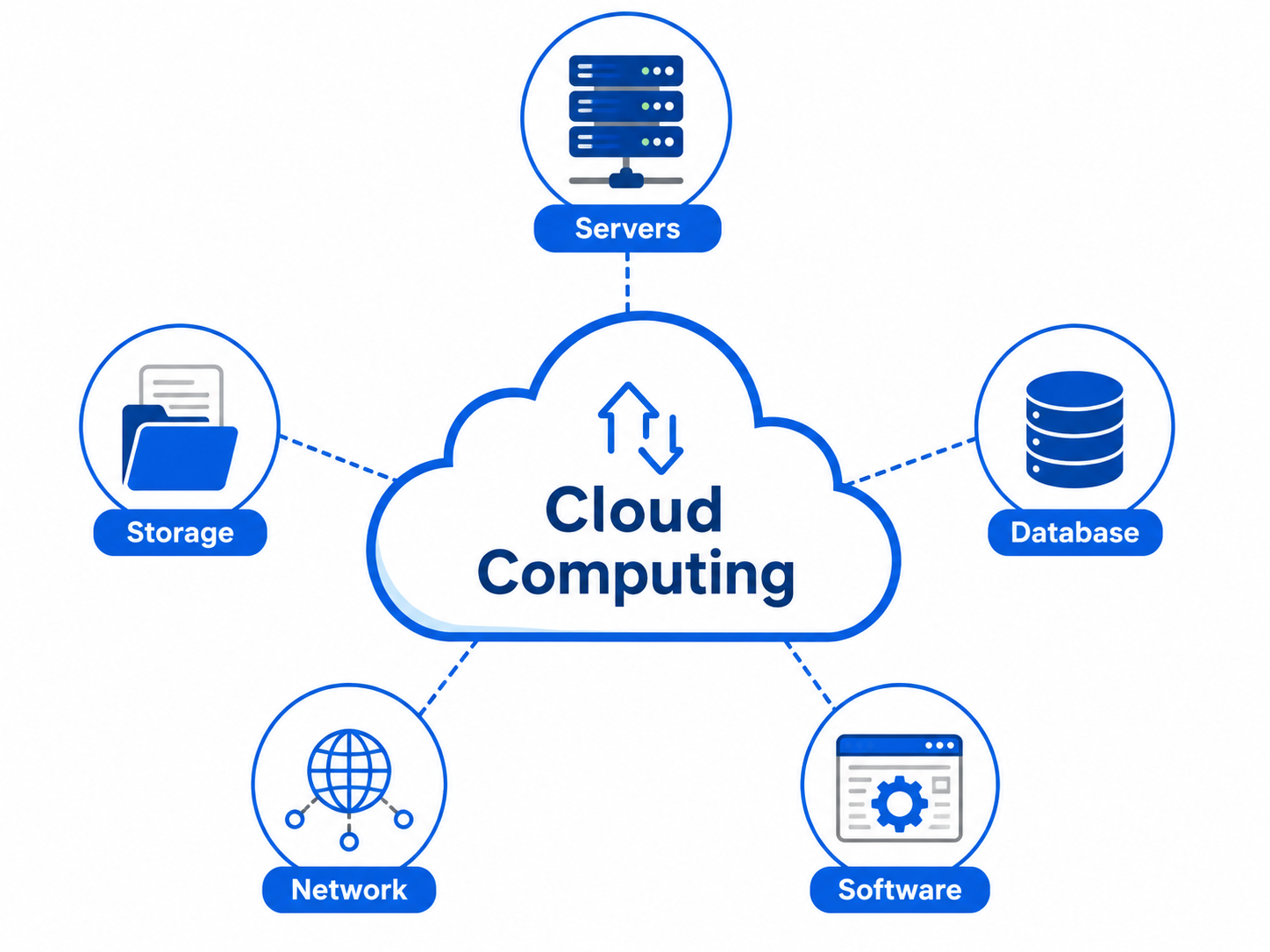
Cloud Computing means delivering computing services such as servers, storage, databases, networking, software, analytics, and applications over the internet. Instead of buying and maintaining physical servers, organizations can use cloud services based on their needs.
In simple words, Cloud Computing allows users to access computing resources through the internet without owning the complete infrastructure.
What is Cloud Computing?
Cloud Computing is a technology that provides computing resources on demand through the internet. These resources may include virtual machines, storage, databases, development platforms, software applications, and security services.
For example, when a user stores files on Google Drive, watches videos on streaming platforms, uses online banking, or accesses web applications, cloud computing may be working in the background.
Why Cloud Computing is Important for IBPS SO IT?
Cloud Computing is important for IBPS SO IT because banks and financial institutions are increasingly using cloud-based infrastructure, digital banking applications, secure data storage, backup systems, disaster recovery, and scalable IT services. An IT Officer should understand cloud models, security issues, virtualization, and service management.
Cloud Computing in Banking Sector
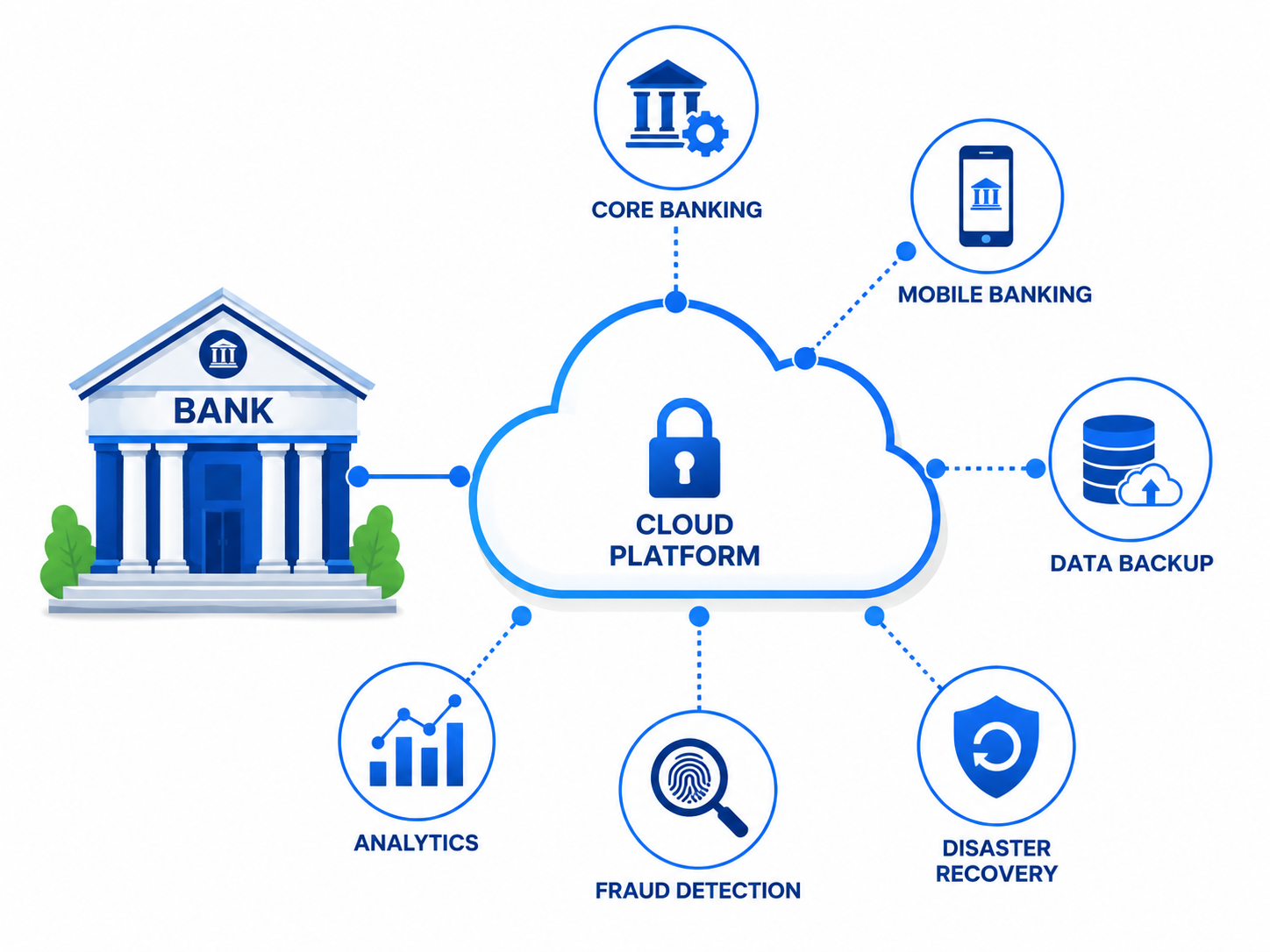
Cloud Computing helps banks improve scalability, reduce infrastructure cost, support digital banking, manage large data, improve disaster recovery, and deploy applications faster. However, banks must also focus on security, compliance, data privacy, access control, encryption, and regulatory requirements.
Banking Use Case Cloud Computing Benefit Mobile Banking Supports scalable and always-available banking applications. Internet Banking Handles high user traffic and secure transactions. Data Backup Stores backup data safely for recovery. Disaster Recovery Helps restore services after failure or disaster. Fraud Detection Supports large-scale data processing and analytics. Customer Support Enables cloud-based CRM and service platforms.
Basic Components of Cloud Computing
Component Meaning Client The user or device that accesses cloud services. Internet The network used to access cloud resources. Cloud Provider The company that provides cloud services. Data Center Physical location where servers and storage are maintained. Virtualization Technology used to create virtual resources from physical hardware. Cloud Services Services such as compute, storage, database, software, and networking.
Characteristics of Cloud Computing
Cloud Computing has some important characteristics that make it different from traditional computing. These characteristics are frequently asked in exams.
Characteristic Meaning Example On-Demand Self-Service Users can get resources whenever needed without manual provider support. Creating a virtual server instantly Broad Network Access Cloud services are accessible through the internet from different devices. Accessing cloud storage from mobile or laptop Resource Pooling Provider resources are shared among multiple users. Multiple customers using shared cloud infrastructure Rapid Elasticity Resources can increase or decrease quickly according to demand. Scaling servers during heavy traffic Measured Service Cloud usage is monitored and billed according to consumption. Pay-as-you-use billing
Cloud Service Models
Cloud service models define what type of service is provided to the user. The three major cloud service models are IaaS, PaaS, and SaaS.
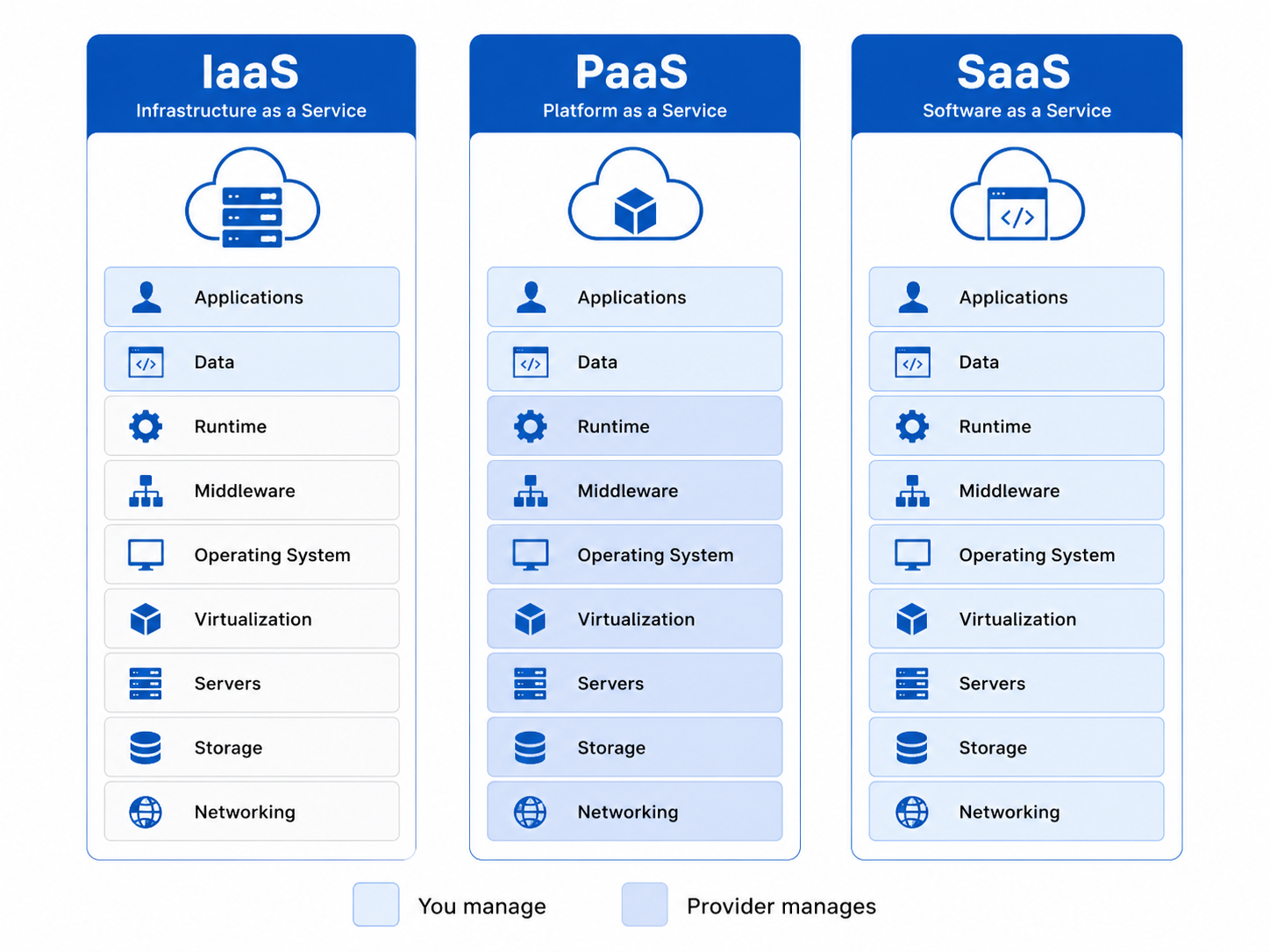
Service Model Full Form Meaning Example Use IaaS Infrastructure as a Service Provides virtual machines, storage, networking, and basic infrastructure. Hosting servers and applications PaaS Platform as a Service Provides platform and tools to develop, test, and deploy applications. Developing web apps without managing servers SaaS Software as a Service Provides ready-to-use software applications over the internet. Email, CRM, online office tools
IaaS: Infrastructure as a Service
IaaS provides basic computing infrastructure such as virtual machines, storage, network, and servers. In IaaS, the cloud provider manages physical hardware, while the user manages operating system, applications, and data.
Example: A company can rent virtual servers instead of buying physical servers.
PaaS: Platform as a Service
PaaS provides a development platform where developers can build, test, and deploy applications without managing the underlying infrastructure. It includes runtime environment, development tools, database services, and deployment support.
Example: A developer can deploy a web application without managing physical servers.
SaaS: Software as a Service
SaaS provides complete software applications over the internet. Users do not need to install or maintain the software. They can access it through a browser or app.
Example: Email services, online document editors, cloud-based CRM, and collaboration tools.
IaaS vs PaaS vs SaaS
Basis IaaS PaaS SaaS User Control High control over OS and applications Control over application, not infrastructure Very limited control Managed By Provider Hardware, storage, networking Infrastructure, runtime, platform Complete software and infrastructure Technical Knowledge Required High Medium Low Best For System administrators and IT teams Developers End users Example Virtual machine hosting Application development platform Online email service
Cloud Deployment Models
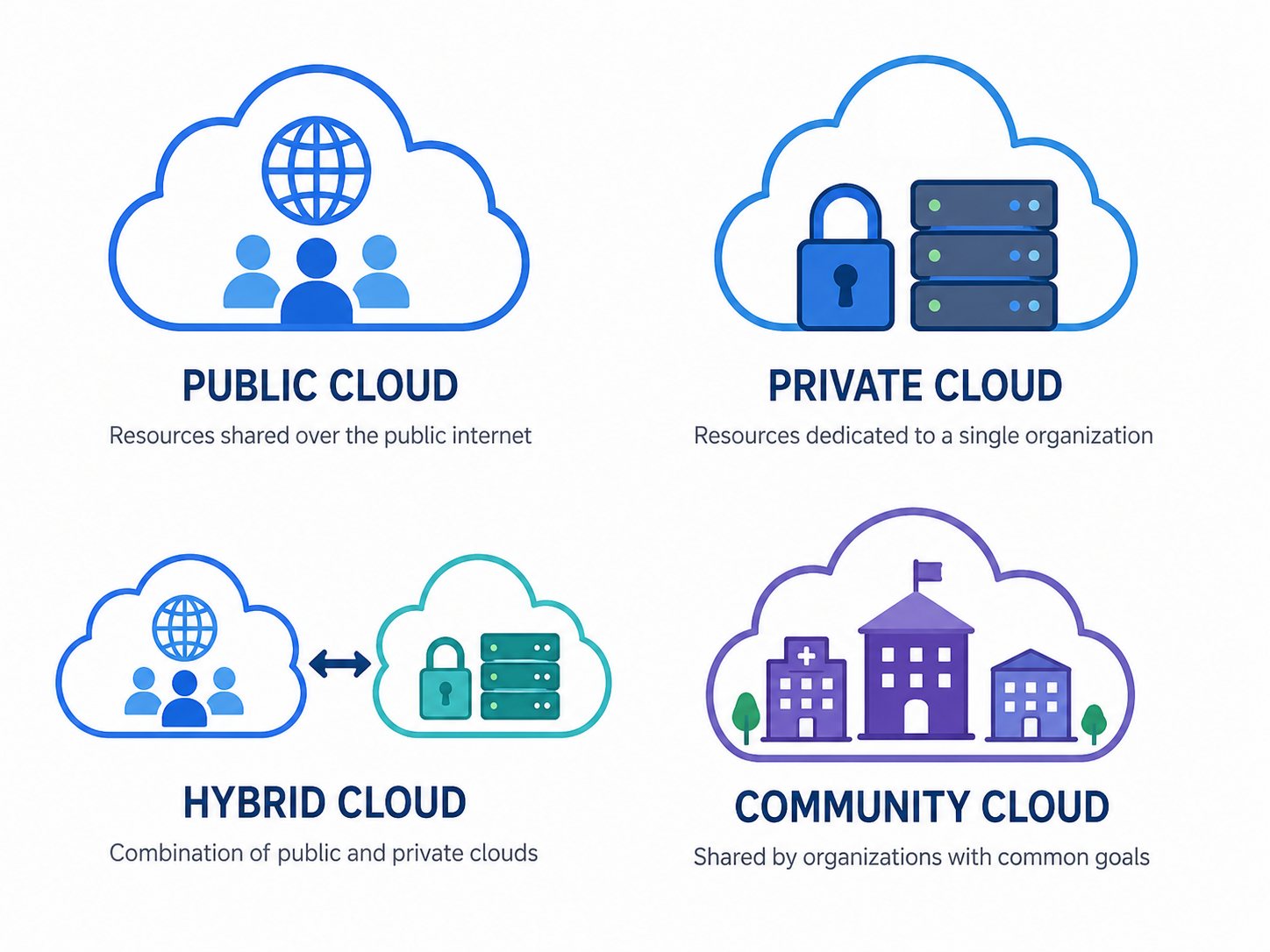
Cloud deployment models define how cloud infrastructure is deployed and who can access it. The main deployment models are public cloud, private cloud, hybrid cloud, and community cloud.
Deployment Model Meaning Best For Public Cloud Cloud services are available to the public over the internet. Startups, general applications, scalable services Private Cloud Cloud infrastructure is used by a single organization. Banks, government, sensitive data systems Hybrid Cloud Combination of public and private cloud. Organizations needing both security and scalability Community Cloud Cloud shared by organizations with common requirements. Healthcare, banking groups, education networks
Public Cloud
Public Cloud is owned and managed by a cloud provider. Services are delivered over the internet and shared among multiple customers. It is cost-effective and scalable, but organizations must carefully manage security and compliance.
Private Cloud
Private Cloud is dedicated to a single organization. It provides better control, privacy, and security. It is suitable for banks and organizations that handle sensitive data.
Hybrid Cloud
Hybrid Cloud combines public cloud and private cloud. Sensitive data can be stored in a private cloud, while less sensitive applications can use the public cloud. It provides flexibility and better resource management.
Community Cloud
Community Cloud is shared by multiple organizations with similar requirements. It is useful when organizations need common security, compliance, or operational policies.
Virtualization in Cloud Computing
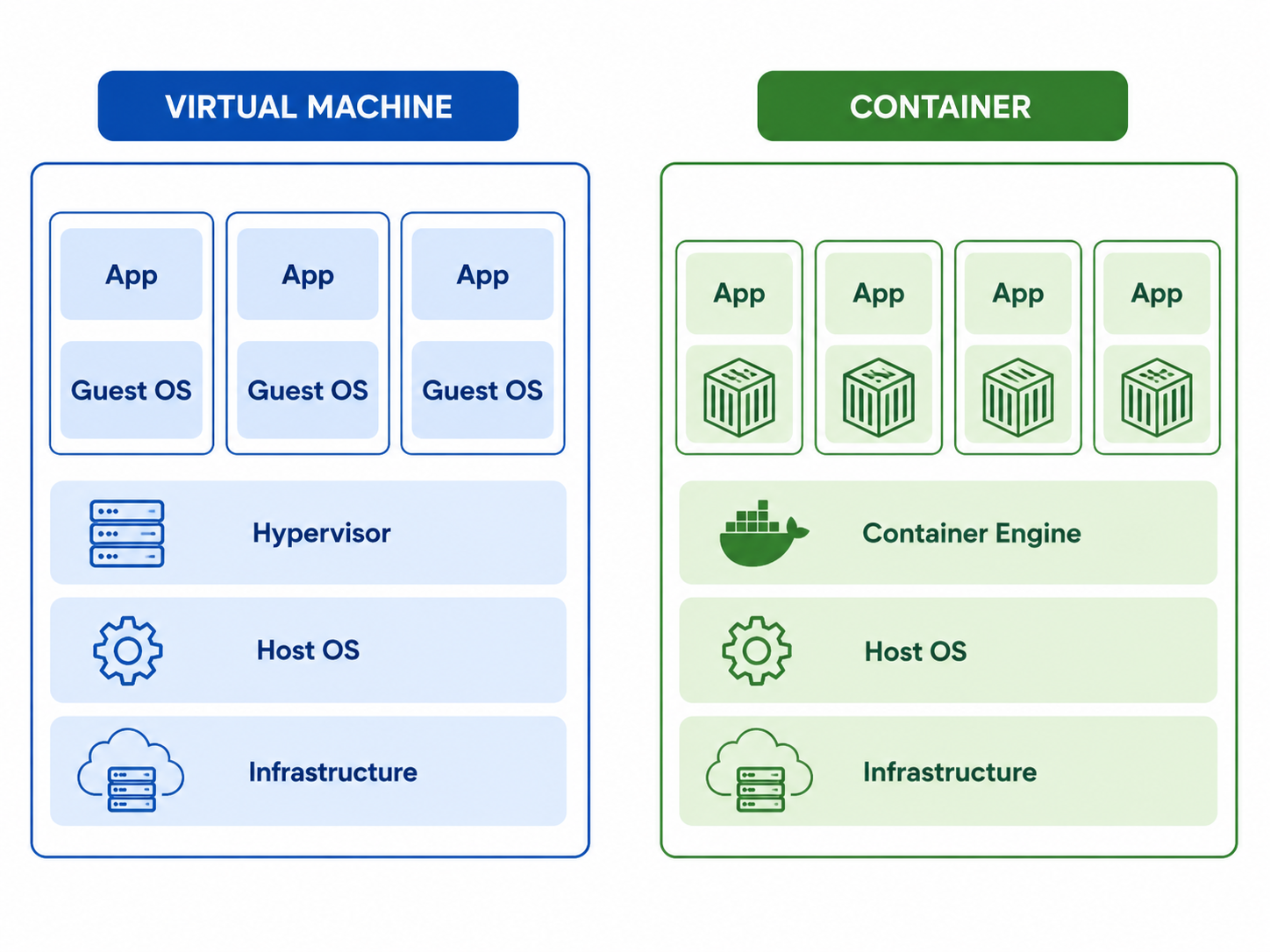
Virtualization is the technology that allows multiple virtual machines to run on a single physical machine. It helps cloud providers use hardware efficiently and provide flexible computing resources to users.
Virtualization is one of the core technologies behind cloud computing.
Important Virtualization Terms
Term Meaning Host Machine The physical machine on which virtualization runs. Guest Machine The virtual machine created on the host machine. Hypervisor Software layer that creates and manages virtual machines. Virtual Machine A software-based computer that runs like a physical computer. VM Image A template used to create virtual machines.
Types of Hypervisors
Hypervisor Type Meaning Example Use Type 1 Hypervisor Runs directly on physical hardware. Enterprise servers and data centers Type 2 Hypervisor Runs on top of a host operating system. Personal computers and testing environments
Containers in Cloud Computing
Containers are lightweight units that package an application with its dependencies. They share the host operating system kernel and start faster than virtual machines.
Containers are widely used for modern application deployment, microservices, DevOps, and cloud-native applications.
Virtual Machine vs Container
Basis Virtual Machine Container Operating System Each VM has its own guest OS. Containers share the host OS kernel. Size Heavyweight Lightweight Startup Time Slower Faster Isolation Strong isolation Process-level isolation Best For Running different operating systems Deploying microservices and cloud-native apps
Serverless Computing
Serverless Computing is a cloud model where the developer writes and deploys code without managing servers. The cloud provider automatically manages server provisioning, scaling, and execution.
In serverless computing, users usually pay only for the actual execution time of their code.
Important Point: Serverless does not mean there is no server. It means the user does not need to manage the server.
Serverless Feature Meaning No Server Management Cloud provider manages infrastructure. Auto Scaling Resources scale automatically based on demand. Event Driven Functions run when events occur. Pay Per Use Billing is based on actual execution.
Cloud Storage
Cloud Storage is a service that allows users to store data on remote servers and access it through the internet. It provides scalability, backup support, accessibility, and reliability.
Types of Cloud Storage
Storage Type Meaning Use Case Object Storage Stores data as objects with metadata. Images, videos, backups, logs Block Storage Stores data in fixed-size blocks. Databases and virtual machine disks File Storage Stores data in file and folder structure. Shared file systems
Scalability and Elasticity
Scalability and elasticity are important concepts in cloud computing. Many students confuse both terms.
Basis Scalability Elasticity Meaning Ability to handle increased workload by adding resources. Ability to automatically increase or decrease resources based on demand. Focus Growth handling Dynamic adjustment Example Adding more servers for more users Auto-scaling during traffic spike and reducing later
Vertical Scaling and Horizontal Scaling
Scaling Type Meaning Example Vertical Scaling Increasing power of the same machine. Adding more RAM or CPU to a server Horizontal Scaling Adding more machines to handle load. Adding more servers behind a load balancer
Load Balancing
Load balancing is the process of distributing network traffic or application requests across multiple servers. It improves performance, availability, and reliability.
For example, if thousands of users access an online banking application, a load balancer distributes requests across multiple servers so that no single server becomes overloaded.
Cloud Security
Cloud Security means protecting cloud-based systems, data, applications, and infrastructure from cyber threats. It includes encryption, access control, identity management, network security, monitoring, backup, and compliance.
Important Cloud Security Concepts
Security Concept Meaning Encryption Protects data by converting it into unreadable form. IAM Identity and Access Management controls user access. MFA Multi-Factor Authentication adds extra login security. Firewall Controls incoming and outgoing network traffic. Backup Protects data against loss or failure. Monitoring Detects unusual activities and performance problems. Compliance Ensures cloud use follows rules and regulations.
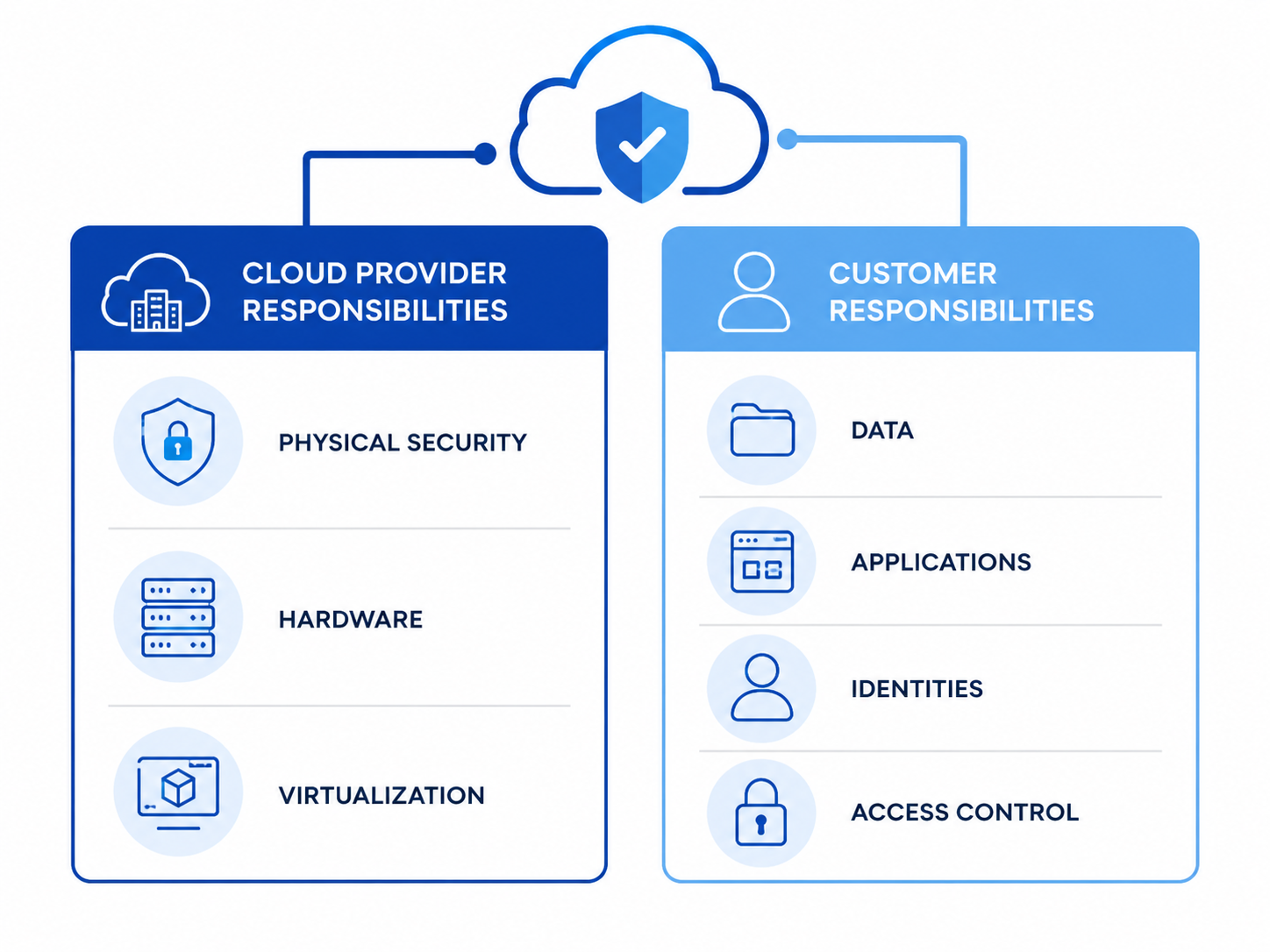
Shared Responsibility Model
The Shared Responsibility Model is a very important cloud security concept. It explains which security tasks are handled by the cloud provider and which tasks are handled by the customer.
Responsibility Cloud Provider Customer Physical Data Center Security Yes No Physical Servers and Hardware Yes No Virtualization Layer Usually yes No Application Security No Yes User Access Management No Yes Data Protection Shared Shared
Cloud Service Level Agreement: SLA
SLA stands for Service Level Agreement. It is a formal agreement between cloud provider and customer. It defines service quality, uptime, performance, availability, support, and responsibilities.
For example, an SLA may promise 99.9% service availability.
SLA Component Meaning Availability How much time the service will remain available. Performance Expected response time and service quality. Support Support response time and issue resolution process. Backup Data backup and recovery commitments. Penalty Compensation if provider fails to meet SLA.
Availability in Cloud Computing
Availability means the ability of a system or service to remain accessible and operational when needed. High availability is important for banking applications because downtime can affect customers and financial transactions.
Cloud Backup and Disaster Recovery
Cloud backup means storing copies of data in the cloud. Disaster recovery means restoring systems and data after a major failure, cyber attack, or disaster.
Cloud-based disaster recovery helps organizations reduce downtime and recover services quickly.
Term Meaning Backup Copy of data stored for recovery. Disaster Recovery Process of restoring services after disaster. RTO Recovery Time Objective. Maximum acceptable downtime. RPO Recovery Point Objective. Maximum acceptable data loss.
Edge Computing
Edge Computing is a computing model where data processing happens closer to the data source instead of sending everything to a central cloud server. It reduces latency and improves real-time processing.
For example, ATM systems, IoT devices, and real-time monitoring systems can benefit from edge computing.
Cloud Computing vs Edge Computing
Basis Cloud Computing Edge Computing Processing Location Centralized cloud data centers Closer to data source Latency Can be higher Lower latency Best For Large-scale storage and processing Real-time processing Example Cloud storage and web applications IoT devices and real-time monitoring
Cloud Computing Advantages
Advantage Meaning Cost Saving Reduces need to buy and maintain physical infrastructure. Scalability Resources can be increased as demand grows. Elasticity Resources can automatically increase or decrease based on demand. Accessibility Cloud services can be accessed from anywhere through the internet. Disaster Recovery Cloud backup helps recover data and services quickly. Fast Deployment Applications and servers can be deployed quickly.
Cloud Computing Challenges
Challenge Meaning Security Risk Cloud systems may face data breaches and cyber attacks. Data Privacy Organizations must protect sensitive customer data. Internet Dependency Cloud services require reliable internet connectivity. Vendor Lock-in It may become difficult to move from one cloud provider to another. Compliance Cloud usage must follow legal and regulatory rules. Downtime Cloud provider outages can affect services.
Important Cloud Computing Terms
Term Meaning Virtual Machine Software-based computer running on physical hardware. Hypervisor Software used to create and manage virtual machines. Auto Scaling Automatically adjusts resources based on demand. Load Balancer Distributes traffic across multiple servers. CDN Content Delivery Network delivers content faster using distributed servers. API Allows applications to communicate with cloud services. Multi-Tenancy Multiple customers share same cloud infrastructure securely. Cloud Migration Moving applications or data from local systems to cloud.
Important Cloud Computing Exam Points for IBPS SO IT Mains
Topic Must Remember Point Cloud Computing Provides computing services over the internet. IaaS Provides virtual machines, storage, and networking. PaaS Provides platform for application development and deployment. SaaS Provides ready-to-use software over the internet. Public Cloud Shared cloud available to public users. Private Cloud Dedicated cloud for one organization. Hybrid Cloud Combination of public and private cloud. Virtualization Core technology behind cloud computing. Hypervisor Creates and manages virtual machines. Container Lightweight package for running applications. Serverless User writes code without managing servers. SLA Agreement defining service quality and availability. Elasticity Automatically increases or decreases resources. Multi-Tenancy Multiple customers share cloud resources securely. Shared Responsibility Security responsibilities are shared between provider and customer.
Common Mistakes Students Make in Cloud Computing
Many students confuse IaaS, PaaS, and SaaS. Remember that IaaS gives infrastructure, PaaS gives development platform, and SaaS gives ready-to-use software.
Students also confuse scalability and elasticity. Scalability means the ability to handle increased workload, while elasticity means automatic increase or decrease of resources based on demand.
Another common mistake is thinking serverless means there is no server. In reality, servers exist, but the user does not manage them.
Students also confuse virtualization and containerization. Virtual machines run full guest operating systems, while containers share the host operating system kernel and are lightweight.
How to Prepare Cloud Computing for IBPS SO IT Mains
To prepare Cloud Computing for IBPS SO IT Mains, start with basic definition, characteristics, service models, and deployment models. Then study virtualization, hypervisors, containers, serverless computing, cloud storage, load balancing, scalability, elasticity, cloud security, SLA, backup, and disaster recovery.
Make short notes of important differences such as IaaS vs PaaS vs SaaS, public cloud vs private cloud, scalability vs elasticity, VM vs container, cloud computing vs edge computing, and provider responsibility vs customer responsibility.
Practice Cloud Computing Quiz
After reading this article, practice MCQs to check your preparation level. Attempt the Cloud Computing quiz here: Start Cloud Computing Quiz
Conclusion
Cloud Computing is an important and scoring topic for IBPS SO IT Mains. Students should focus on cloud characteristics, service models, deployment models, virtualization, containers, serverless computing, cloud storage, cloud security, SLA, scalability, elasticity, backup, and disaster recovery. With regular revision and MCQ practice, Cloud Computing can help improve your Professional Knowledge score.
Frequently Asked Questions on Cloud Computing
What is Cloud Computing?
Cloud Computing is the delivery of computing services such as servers, storage, databases, networking, software, and applications over the internet.
Why is Cloud Computing important for IBPS SO IT?
Cloud Computing is important for IBPS SO IT because questions can be asked from service models, deployment models, virtualization, cloud security, storage, SLA, and cloud technologies.
What are the main service models of cloud computing?
The main service models are IaaS, PaaS, and SaaS.
What is IaaS?
IaaS stands for Infrastructure as a Service. It provides virtual machines, storage, networking, and other infrastructure resources.
What is PaaS?
PaaS stands for Platform as a Service. It provides a platform for developing, testing, and deploying applications.
What is SaaS?
SaaS stands for Software as a Service. It provides ready-to-use software applications over the internet.
What are the main deployment models of cloud computing?
The main deployment models are public cloud, private cloud, hybrid cloud, and community cloud.
What is virtualization in cloud computing?
Virtualization is a technology that allows multiple virtual machines to run on a single physical machine.
What is a hypervisor?
A hypervisor is software that creates and manages virtual machines.
What is serverless computing?
Serverless computing is a cloud model where developers run code without managing servers. The cloud provider manages the infrastructure.
What is SLA in cloud computing?
SLA stands for Service Level Agreement. It defines service availability, performance, support, and responsibilities between cloud provider and customer.
What is the difference between scalability and elasticity?
Scalability is the ability to handle increased workload by adding resources. Elasticity is the ability to automatically increase or decrease resources based on demand.
What is the shared responsibility model?
The shared responsibility model explains which security tasks are handled by the cloud provider and which tasks are handled by the customer.
Is Cloud Computing scoring for IBPS SO IT Mains?
Yes, Cloud Computing can be a scoring topic if students revise service models, deployment models, virtualization, cloud security, SLA, and important differences properly.
Practice Quiz
After reading this article, test your preparation with our quiz: Start Quiz